The Restaurant Operating System

One system to run your POS

Tawle replaces your POS and unifies QR ordering, the kitchen display, tables, waiters, chefs, inventory and delivery — into a single operating system for your restaurant. Dine-in or fast food. One branch or fifty.

Replaces 6+ tools · 4 ordering channels · 22 payment gateways · Multi-branch

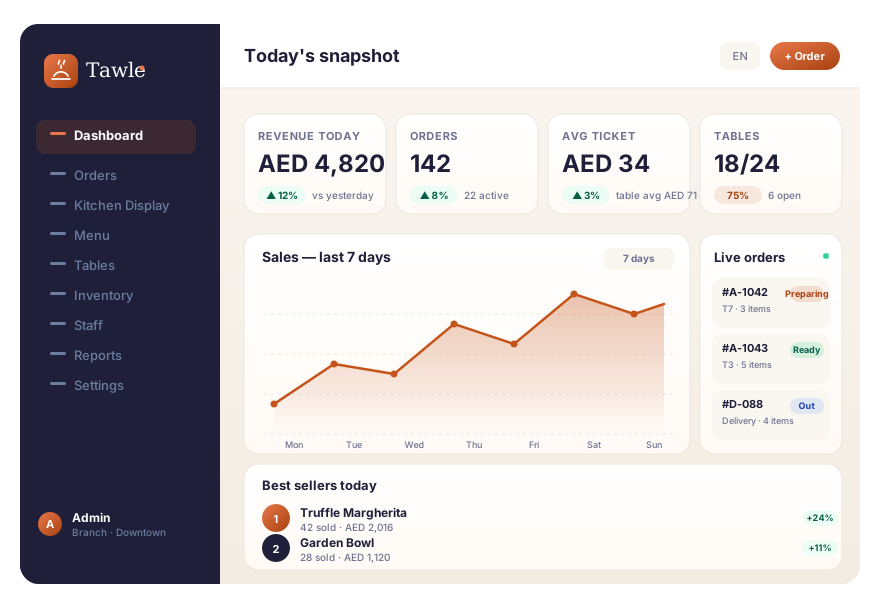
Tawle restaurant dashboard — live orders, sales chart, KPIs
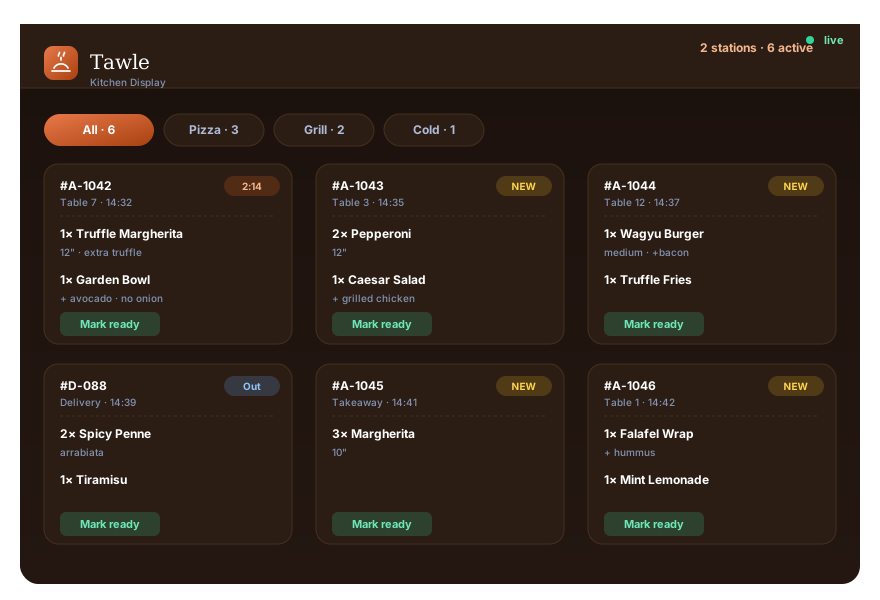
Tawle Kitchen Display System — live order tickets
0 Payment gateways
0 Built-in roles
0 SMS gateways
0 UI languages
Live order journey

Follow one order across the whole restaurant

Press play and watch a real dine-in order move from a guest's phone, through the kitchen and waiters, to a split bill and your dashboard — every actor and every module, in sync.

Who's involved right now

1 / 9
🍝 Truffle Pasta AED 48
Add to order
${ICON_QR}
#A-1042 · Table 7 2:14
1× Truffle Pasta Preparing
1× Garden Bowl Preparing
Mozzarella stock −220g ✓
Mark ready
${ICON_FIRE}
SubtotalAED 88.00
Tax (5%)AED 4.40
TotalAED 92.40
Split · 3 waysAED 30.80
Pay AED 30.80
+ add a tip
${ICON_CHART}
01 Step one

The guest scans the table QR.

The branded menu opens instantly on their own phone — no app, no account. Their table, their menu, their language.

02 Step two

The ticket hits the kitchen in 0 ms.

No waiter relay, no handwriting, no re-typing. Items route to the right station with a sound alert — and as they're prepared, the ingredients are deducted from stock in real time.

03 Step three

Pay, split, and reconcile — automatically.

Guests split the bill at the QR — equal, by item, or by custom amount. Every payment writes a transaction. Your books close themselves.

Why one integrated system wins

Scrap the stack. Run on one.

Most restaurants juggle a POS, a QR menu, a kitchen screen, a delivery tool, spreadsheets for stock and a separate report. Tawle is all of it — so nothing is re-keyed, nothing is missed, and everyone sees the same truth.

${ICON_LAYERS}

One system, not six

Replace your POS, QR menu, KDS, delivery app, stock sheets and reporting with a single integrated platform.

6+ tools → 1
${ICON_SMILE}

Happier guests

Order and pay straight from the table by QR — no waiting to flag someone down, no queue to settle up.

Self-serve order & pay
${ICON_BOLT}

Faster to the kitchen

Orders flow from the guest's phone to the right station automatically — no waiter relay, no re-typing.

Order → kitchen, instantly
${ICON_TRAY}

Waiters do more

Guests self-order and self-pay, so waiters focus on service and cover more tables per shift.

More tables / waiter
${ICON_SHIELD}

No missed orders

Every order is captured digitally and tracked through a defined lifecycle. Nothing slips through.

0 lost tickets
${ICON_NOPAPER}

No paper, no delays

Digital tickets and optional thermal receipts. No handwriting, no runner, no bottleneck at the pass.

Paperless by default
${ICON_EYE}

Total visibility

Live dashboards and analytics per branch and per item — monitor every station with real timestamps.

Per-branch & per-item
${ICON_HISTORY}

Clean books

Every payment writes a transaction — split bills, QR payments and POS all reconcile automatically.

Full transaction history
The handoffs, choreographed

Fewer touchpoints, faster service

Watch how the guest ↔ waiter ↔ kitchen ↔ waiter ↔ guest relay collapses when guests order and pay at the QR. Less waiting for them, less running for your team.

Traditional The old relay

${ICON_CLOCK} 7 handoffs · waiter on every step
${ICON_HAND}

Flag a waiter

Guest → Waiter
${ICON_ARROW}
${ICON_RECEIPT}

Write the order

Waiter
${ICON_ARROW}
${ICON_FIRE}

Walk it to kitchen

Waiter → Kitchen
${ICON_ARROW}
${ICON_TRAY}

Serve & later bring bill

Kitchen → Waiter → Guest
${ICON_ARROW}
${ICON_POS}

Carry payment back

Guest → Waiter → POS

With Tawle Direct & automatic

${ICON_BOLT} 3 handoffs · waiter only serves
${ICON_QR}

Order at the QR

Guest
${ICON_ARROW}
${ICON_FIRE}

Straight to station

Automatic → Kitchen
${ICON_ARROW}
${ICON_TRAY}

Waiter serves

Kitchen → Waiter
${ICON_ARROW}
${ICON_SPLIT}

Pay & split at the QR

Guest
${ICON_ARROW}
${ICON_CHART}

Auto-recorded

Automatic → Books
The flows that earn their keep

Where Tawle gets clever

Six flows the team worked hard on. Click through to see how each one stays consistent across the kitchen, the floor and the books.

Table session open How to pay?Guest or staff chooses Pay full Split equallyN people Split by itemPay your own Transactions loggedSession auto-closes when all paid

Split the bill — exactly, to the cent

Three modes: pay full, split equally, split by item. The 100 ÷ 3 = 33.33 problem? Solved — the last split absorbs the cent remainder, so the sum is always exact.

  • Equal split with remainder absorption (the 0.01 fix)
  • Item-based with no duplicate assignment
  • Session auto-closes only when every split is paid
  • Optional tip captured per split
Item prepared Look up recipe Deduct ingredients Log stock movement Low-stock alert → reorder

Self-updating inventory

Every time a chef marks an item ready, the recipe ingredients are deducted from stock in real time. When an ingredient hits zero, every dish that needs it is auto-86'd.

  • Recipe-based auto-deduction (no end-of-day counting)
  • Stock movements logged with reason + user
  • Low-stock alerts push to the manager's phone
  • Auto-86 cascades up to the menu — guests only see what's possible
Paid order Refund requested Full refund Partial refund Manager PIN Reason logged Reversing transaction

Refunds — clean, auditable, idempotent

Full or partial refunds require a manager PIN and a reason. The original transaction is reversed with a matching negative entry — your books stay clean and the cashier's till reconciles.

  • Manager-PIN gate on every refund
  • Reason code recorded for the audit trail
  • Reversing transaction (negative sign, type=refund)
  • Idempotent — retrying won't double-refund
Manual 86Staff toggle Off untilend of shift / time Menu updated Auto-86Stock cascade Recipe checkingredients low Cascade hide Schedule 86breakfast / dinner Time-basedday of week Auto un-86

86 board — three ways to hide an item

Sometimes a dish is gone because the chef said so, sometimes because the stock ran out, sometimes because it's only on the lunch menu. Tawle supports all three — and brings items back automatically.

  • Manual 86 — one-tap toggle, with optional end-of-shift reset
  • Auto-86 from stock — recipes cascade, item hides the moment an ingredient runs dry
  • Schedule 86 — breakfast vs dinner, weekday vs weekend, time-of-day rules
Top-up Wallet balance Order pay Receipt + history Order history Saved address Reorder in 1 tap

Customer wallet + 1-tap reorder

Top up once, pay from the wallet next time. Order history, saved addresses and the wallet balance all live in the same profile — so a returning guest reorders the same meal in seconds.

  • Prepaid wallet with top-up and spend history
  • Saved delivery addresses, per guest
  • Order history across every branch
  • 1-tap reorder of the previous order
Group HQ · one admin Branch ADowntown Branch BMarina Branch CCloud kitchen Per-branch P&L Items + staff Stock Group roll-up, live

Multi-branch — same numbers, every level

Drill from group → branch → item → order without re-keying. Every report reads the same source of truth the cashier is ringing into — no exports, no joins, no 30-tab spreadsheet.

  • Switch branches in one click, with branch-scoped data
  • Group roll-up without a separate warehouse
  • Per-item, per-server, per-station drill-downs
  • CSV / PDF export, accountant-ready
Built for every service style

One platform, six service types

Whether you run a single café or a 50-branch group, the same OS adapts. Drag the cards, or use the arrows.

Dine-in café

Tabletop café

Cozy café, 12–30 covers, fast table turnover. Guests scan, order, pay — waiters focus on great coffee and warm service.

  • QR menu, self-pay, split by item
  • One waiter for 8–10 tables
  • Live dashboard on the bar iPad
🍔 Fast food

Quick-service counter

Counter, kiosk, or QR — Tawle prints tokens, fires tickets to the KDS, and calls orders on the status screen the second they're ready.

  • POS with numpad & change
  • Status screen integration
  • Tokens, kitchen bump bar
🛵 Cloud kitchen

Delivery-only

No front of house, just a tight prep line. The same KDS, the same order workflow — only the source is online orders and 22 payment gateways.

  • Online order capture + address
  • Auto-routing by delivery zone
  • Out-for-delivery status
🍷 Restaurant group

5–50 branch group

One admin panel, every branch isolated. Group-wide reporting on revenue, items, staff and stock — without spreadsheets.

  • Per-branch menus, prices, staff
  • Group-wide analytics roll-up
  • Multi-currency, multi-language
🍽️ Fine dining

Full-service restaurant

Waiter-led service with coursing, table sessions and split-by-item bills. The same QR self-pay is there when guests want it.

  • Waiter tablet on the floor
  • Session discounts & tips
  • Item-based splits, 2–20 payers
🚚 Food truck

Pop-up & mobile

One tablet, one printer, one menu. QR ordering keeps the queue moving, even when you only have 30 m² and a window.

  • Tablet-only, no fixed hardware
  • Bluetooth thermal printing
  • Offline-tolerant ordering
The state machine under the hood

Every order, one clear lifecycle

Tawle drives each order through a defined workflow — with built-in paths for rejections, cancellations and returns. The diagram draws itself as you scroll.

PENDINGOrder placed ACCEPTConfirmed by staff PREPARINGIn the kitchen PREPAREDAll items ready OUT_FOR_DELIVERYRider / table run DELIVEREDComplete & reconciled REJECTED CANCELED REFUNDED (voided order) RETURNED
Happy path Exception paths (reject · cancel · void/refund · return)
One platform, every service style

Built for dine-in and fast food alike

The same engine adapts to how you serve. Flip between channels and see the flow change.

${ICON_QR}

Scan table QR

Guest opens the menu on their phone.

${ICON_ARROW}
${ICON_CART}

Order at table

Straight to the kitchen, no waiting.

${ICON_ARROW}
${ICON_FIRE}

Kitchen prepares

KDS routes items to stations.

${ICON_ARROW}
${ICON_TRAY}

Waiter serves

Assigned waiter runs the order.

${ICON_ARROW}
${ICON_SPLIT}

Session & split

One tab, split & pay any way.

${ICON_POS}

Order at POS / QR

Counter or self-order kiosk.

${ICON_ARROW}
${ICON_RECEIPT}

Pay & get token

Cash, card, mobile — token issued.

${ICON_ARROW}
${ICON_FIRE}

Kitchen prepares

Ticket hits the KDS instantly.

${ICON_ARROW}
${ICON_BELL}

Status screen calls

Order number shown when ready.

${ICON_ARROW}
${ICON_TRAY}

Pickup

Guest collects at the counter.

${ICON_CART}

Order online

Address & geolocation captured.

${ICON_ARROW}
${ICON_RECEIPT}

Pay online

22 gateways, or cash on delivery.

${ICON_ARROW}
${ICON_FIRE}

Kitchen prepares

Same workflow, same KDS.

${ICON_ARROW}
${ICON_TRUCK}

Out for delivery

ETA & status tracked.

${ICON_ARROW}
${ICON_CHECK}

Delivered

Recorded & reconciled.

A day in the life

One OS, the right view for every role

Seven roles, granular permissions, zero clutter. Pick a role to see their tools and their journey through a shift.

The Guest

No app · no account · just a phone

Scans the table QR, browses a rich menu with photos and dietary tags, orders round after round, and settles up however suits the table — equal, by item, or by custom amount.

QR MenuCart & checkoutOrder statusPay@TableSplit billOrder historySaved addresses
  • Scan & browseOpens the branded menu tied to their exact table — full multilingual support, with allergen and dietary filters.
  • Order from the tableAdds variations, extras, special instructions. Cart totals tax and offers live.
  • Track & reorderWatches status and adds more rounds to the same running tab — no re-keying.
  • Split & payPay their share by QR with an optional tip. Receipt by email, SMS, or in-browser.

The Waiter

On the floor, always in the loop

Sees which tables need attention, what's ready to run, and can take or adjust orders on behalf of guests — with their performance tracked per shift.

Assigned tablesTable ordersReady alertsOpen sessionsTake / edit ordersVoids & compsPer-server sales
  • Get assigned tablesManager assigns at open; performance and tips are tracked per server.
  • Take or edit ordersAdd items for guests, apply a discount, fix an order on the fly — all from the floor tablet.
  • Run ready foodGet pinged the moment the kitchen marks an item ready. The order is yours to serve.
  • Close the tabApply a session-level discount, take payment, or hand off to the guest's Pay@Table flow.

The Chef

Heads-down on the Kitchen Display

Works a clean, real-time ticket feed — items routed to the right station, marked ready individually, with stock deducting as dishes are made and a sound alert on every new order.

Kitchen Display (KDS)Cooking stationsItem ready / cancelRecipesAge timerSound alerts
  • See new ticketsSound alert + silent auto-refresh. No missed orders, no paper slips.
  • Cook by stationItems routed to pizza, grill, cold, bar — each line sees only their own.
  • Mark items readyPer-item; the order auto-completes when the last item is ready.
  • Flag issuesCancel an item with a reason — stock adjusts and the manager gets notified.

The POS Operator

Fast counter service, zero friction

Rings up walk-ups in seconds with an on-screen numpad, takes any payment type, splits when needed, and prints receipts on thermal or browser. No training curve.

POSNumpad & changeOrder tokensOrder splitsThermal print22 gateways
  • Build the orderTap items, variations & extras at speed. Search and recent items keep it fast.
  • Take paymentCash, card, mobile banking. Change is calculated, tip captured, receipt printed.
  • Split if needed2–20 payers, equal or custom amounts. All splits reconcile to the same total.
  • Print & fireAuto thermal receipt + token; the ticket fires to the KDS the same second.

The Branch Manager

The whole floor at a glance

Owns one location end to end — menu, staff, tables, stock and numbers — with a live dashboard of sales, peak hours, and order status across every station.

DashboardMenu & offersInventoryStaff & tablesReports86 boardCustomer database
  • Open the branchToday's snapshot: revenue, covers, avg ticket, peak hour — refreshed every few minutes.
  • Tune the menu86 items, launch offers, adjust taxes, edit variations and extras.
  • Run operationsAssign waiters, manage tables, manage stock, oversee sessions and voids.
  • Reconcile & reportTransactions, best-sellers, exports — clean books at end of day.

The Admin

Every branch, one control room

Runs the whole group: branches, roles & permissions, payment and SMS gateways, branding, currencies and global configuration. Full feature-level CRUD, scoped per branch.

Multi-branchRoles & permissions22 payment gateways8 SMS gatewaysBrandingMulti-currencyAudit log
  • Add branchesSpin up a new location with its own menu, staff, tables and pricing in minutes.
  • Set who can do whatFeature-level CRUD per role. The 7 built-in roles cover 90% of cases; custom roles for the rest.
  • Connect the railsPlug in 22 payment + 8 SMS gateways, push configuration live to every branch.
  • Brand & scaleYour logo, your colours, your own domain across the whole guest and staff experience.
The platform

Every module your restaurant runs on

Each part of Tawle works on its own and talks to the rest — so an order, a payment and a stock movement are always the same source of truth.

${ICON_QR}QR Menu & Ordering
${ICON_POS}Point of Sale
${ICON_FIRE}Kitchen Display
${ICON_BELL}Order Status Screen
${ICON_TABLE}Tables & Sessions
${ICON_TRAY}Waiters & Chefs
${ICON_TRUCK}Delivery & Takeaway
${ICON_BOX}Inventory & Stock
${ICON_RECIPE}Recipes & Suppliers
${ICON_TAG}Offers, Tax & Currency
${ICON_USERS}Customers & Wallet
${ICON_CHART}Reports & Analytics
${ICON_BELL}Notifications
${ICON_USERDB}Customer Database
${ICON_TOKEN}Order Tokens
${ICON_GLOBE}Multi-language
${ICON_LOCK}Roles & Permissions
${ICON_STATION}Cooking Stations
${ICON_ALERT}Out-of-Stock Control
${ICON_LEAF}Allergens & Upsell
Run it like a pro

The controls owners & managers actually want

Real-time alerts, stock-aware menus, and the guardrails that keep a busy multi-branch operation tight.

${ICON_BELL}

Live notifications

Built-in alerts for waiters (food ready), the kitchen (new tickets, sound), and dashboards — so the right person acts the moment it matters.

${ICON_CHART}

Analytics that drill down

Sales, best-sellers and trends per branch and per item. Today's snapshot, orders-by-status and peak hours let owners monitor from anywhere.

${ICON_ALERT}

Never sell what you're out of

Inventory auto-marks items out of stock as ingredients run dry — or staff toggle an item off instantly. Guests only see what you can actually make.

${ICON_STATION}

Cooking stations → categories

Create stations (grill, pizza, cold, bar) and link them to menu categories, so every ticket routes to the line that cooks it.

${ICON_LEAF}

Allergens & upsell

Tag allergens and dietary info on items, and drive bigger tickets with extras, add-ons and "frequently bought together" upsells.

${ICON_GLOBE}

Multi-language

Serve guests and staff in their language — and add or edit languages yourself, with full control over every label.

${ICON_LOCK}

Role-based access control

Seven roles with feature-level CRUD permissions. Everyone sees exactly what they should — nothing more.

${ICON_CLOCK}

Timestamps & monitoring

Each order and station carries timestamps, so you can see where time goes and squeeze out delays.

${ICON_USERDB}

Customer database

Profiles, order history, saved addresses and prepaid wallet balances — your guest relationships, owned by you.

Scales with you

From one café to a whole group

Run every location from a single admin panel. Each branch keeps its own menu, pricing, staff, tables and stock — while you see the group's numbers roll up in one place.

    Branch-level menus & pricing Per-branch staff & permissions Switch branches in one click Group-wide reporting Multi-currency
Tawle — Group HQOne admin panel · live group reporting
${ICON_TABLE}
DowntownDine-in
${ICON_POS}
MarinaFast food
${ICON_TRUCK}
Cloud kitchenDelivery
On the roadmap

Coming soon to Tawle

The platform keeps growing. Here's what's next — and yes, it's all part of the same integrated system.

Coming soon
${ICON_HAND}

Call waiter

Let guests request service, water or the bill from the QR menu — routed instantly to the assigned waiter.

Works with your stack

Plug in payments & messaging

Connect the gateways your customers already trust — and reach them by SMS, email or push.

StripePayPalRazorpay MyFatoorahPaytmPaystack FlutterwaveMollieCashfree PhonePeSSLCommerzTwilio VonageFirebase Push+ 22 gateways in all
${ICON_SHIELD}PCI-DSS aware
${ICON_LOCK}Encrypted in transit
${ICON_GLOBE}UAE data residency
${ICON_CHECK}Daily backups
See it in action

Ready to run your restaurant on Tawle?

Explore a fully-loaded demo, or tell us about your venue and we'll set up a tailored demo on your own branded link.